
오늘 학습 키워드
유니티 심화
오늘 학습 한 내용을 나만의 언어로 정리하기
유니티 심화 (3D)
시네머신
-
유니티에서 제공하는 고급 카메라 시스템
-
1개의 브레인 카메라와 여러 개의 가상 카메라로 이루어짐
-
시네머신 시스템 내에 있는 다양한 기능들
- 블렌드 카메라 리스트 : 여러 개의 가상 카메라가 있을 때 그 카메라들 간의 전환을 도와줌
- 스테이트 드라이브 카메라 : 애니메이션 상태에 따라 카메라 전환을 도와줌
- 클리어 샷 카메라 : 오브젝트 때문에 카메라가 가릴 때 알아서 전환해줌
- 돌리 카메라 : 가상의 돌리 레일을 깔아두면 그 경로대로 카메라가 이동함
-
시네머신 자체의 주요 기능
- 가상 카메라
- 카메라 블렌딩
- 트랙킹과 추적
- 애니메이션 연동
- 렌즈 세트
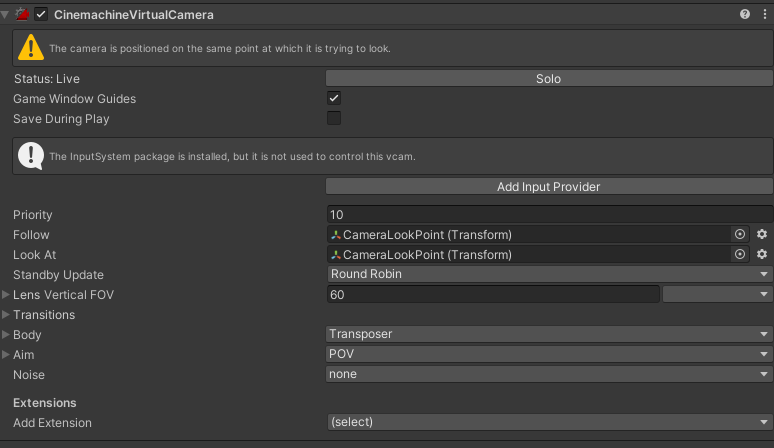
- Follow : 따라갈 트랜스폼
- Look At : 보는 방향 트랜스폼
- Body : 카메라의 트랜스폼을 여기서 설정
- Transposer : 기본
- Framing Transposer : 탑다운 방식으로 할 때 유용
- Aim : 카메라 회전 관련으로 여기서 설정 (Input으로 바로 받아오게도 할 수 있음)
- Add Extension : 여기서 추가 기능 설정 가능
- Cinemachine Collider : 카메라가 Follow 말고 다른 물체를 가리키게 될 때 자동으로 Follow 다시 비출 수 있도록 이동 (ex. 벽 안에 들어갔을 때)
플레이어 점프 구현
// ForceReceiver.cs
void Update()
{
    if (controller.isGrounded)
    {
        verticalVelocity = Physics.gravity.y * Time.deltaTime;
    }
    else
    {
        // 땅 위에 있으면 가속도를 계속 더해서 받게
        verticalVelocity += Physics.gravity.y * Time.deltaTime;
    }
}

public void Jump(float jumpForce)
{
    verticalVelocity += jumpForce;
}
// PlayerBaseState.cs
private void Move(Vector3 direction)
{
float movementSpeed = GetMovementSpeed();
stateMachine.Player.Controller.Move(((direction * movementSpeed) + stateMachine.Player.ForceReceiver.Movement) * Time.deltaTime);
}// PlayerJumpState.cs
public override void Update()
{
base.Update();
// 점프 상태인데 속도가 음수다 > 떨어지는 중이다 > Idle 로 변경
if (stateMachine.Player.Controller.velocity.y <= 0)
{
stateMachine.ChangeState(stateMachine.IdleState);
return;
}
}플레이어 추락 구현
- 점프하지 않았는데도 떨어질 때
// PlayerGroundState.cs
public override void PhysicsUpdate()
{
    base.PhysicsUpdate();

    // isGrounded 가 아니고,
    // 플레이어의 수직 이동속도가 중력 가속도 * fixedDeltaTime보다 작을 때 => 떨어지는 중이라고 판정
    if (!stateMachine.Player.Controller.isGrounded
        && stateMachine.Player.Controller.velocity.y < Physics.gravity.y * Time.fixedDeltaTime)
    {
        stateMachine.ChangeState(stateMachine.FallState);
    }
}- 점프하고 떨어질 때
// PlayerJumpState.cs
public override void Update()
{
    base.Update();
    if (stateMachine.Player.Controller.velocity.y <= 0)
    {
        stateMachine.ChangeState(stateMachine.FallState);
        return;
    }
}
플레이어 공격 구현
- 현재 애니메이션에 대해서 정보를 가져오는 방법 = AnimatorStateInfo
// PlayerBaseState.cs
protected float GetNormalizedTime(Animator animator, string tag)
{
    AnimatorStateInfo currentInfo = animator.GetCurrentAnimatorStateInfo(0);
    AnimatorStateInfo nextInfo = animator.GetNextAnimatorStateInfo(0);
    // 애니메이션이 전환되고 있을 때 && 다음 애니메이션이 tagif (animator.IsInTransition(0) && nextInfo.IsTag(tag))
    {
        return nextInfo.normalizedTime;
    }
    // 전환되고 있지 않을 때 && 현재 애니메이션이 tag    else if (!animator.IsInTransition(0) && currentInfo.IsTag(tag))
    {
        return currentInfo.normalizedTime;
    }
    else
    {
        return 0;
    }
}- 이걸로 콤보어택 구현
// PlayerComboAttackState.cs
public override void Update()
{
    base.Update();

    ForceMove();

    float normalizedTime = GetNormalizedTime(stateMachine.Player.Animator, "Attack");
    if (normalizedTime < 1f) // 공격 모션이 끝나지 않았을 때
    {
        if (normalizedTime >= attackInfoData.ComboTransitionTime)
        {
            // 콤보 시도
            TryComboAttack();
        }

        if (normalizedTime >= attackInfoData.ForceTransitionTime)
        {
            // 댐핑 시도
            TryApplyForce();
        }
    }
    else // 공격 모션이 끝났을 때
    {
        if (alreadyAppliedCombo) // 콤보를 적용했을 때
{
            // 콤보 인덱스에 다음 콤보 넣어주고 상태 다시 실행 => 다음 콤보 진행
            stateMachine.ComboIndex = attackInfoData.ComboStateIndex;
            stateMachine.ChangeState(stateMachine.ComboAttackState);
        }
        else // 콤보를 적용하지 않았을 때
{
            stateMachine.ChangeState(stateMachine.IdleState);
        }
    }
}

void TryComboAttack()
{
    if (alreadyAppliedCombo) return; // 이미 다음 콤보 적용 했을 때
    if (attackInfoData.ComboStateIndex == -1) return; // 마지막 콤보일 때
    if (!stateMachine.IsAttacking) return;

    alreadyAppliedCombo = true;
}

void TryApplyForce()
{
    if (alreadyAppliedForce) return; // 이미 힘을 적용했을 때
    alreadyAppliedForce = true;

    stateMachine.Player.ForceReceiver.Reset(); // 힘 초기화
    stateMachine.Player.ForceReceiver.AddForce(Vector3.forward * attackInfoData.Force); // 앞쪽으로 나아가도록 설정
}
적 만들기
- 플레이어랑 똑같이 진행하지만 상태를 세 개만 설정 (Idle, Chasing, Attack)
플레이어 피격 설정
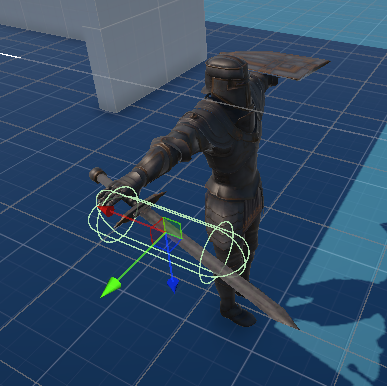
- 오른쪽 팔 조인트 부분에 빈 오브젝트 만들어서 콜라이더랑 리지드 바디 설정