
오늘 학습 키워드
Firebase(파이어베이스)
오늘 학습 한 내용을 나만의 언어로 정리하기
챌린지 반 강의 (주제 : Firebase)
Firebase란 무엇인가
- 앱 개발을 위한 통합 백엔드 서비스
- 서버를 직접 만들지 않고도 필요한 기능을 클라우드에서 바로 사용할 수 있게 해줌
- 주요 기능
- 인증
- 데이터베이스 : RTDB - Json 트리 구조, 빠른 실시간 동기화
- 저장소
- 호스팅
- 클라우드 함수 : 서버 커스터마이징
- 분석
- 원격 구성
- 푸시 메시지
- 서버 없이 게임을 만들기 위해 Firebase를 사용함.
Firebase 세팅하기
- Firebase 콘솔에서 프로젝트 생성
- Firebase 콘솔 들어가서 “프로젝트 추가” > 프로젝트 이름 입력해서 생성
- 앱 등록 (Unity와 연결)
- 앱 플랫폼 선택 (게임이라면 안드로이드/ios 둘 다 연결하는 경우 많음)
- 앱 패키지 이름 입력
- Other Settings > Identification > Override Default Package Name > Package Name 에 있음
- (예시 : com.HyerimLee.FirebaseTest)
- 앱 등록 후, 구성 파일 다운로드하고 그거를 Unity에 StreamingAssets 등, 빌드 시에 무조건 포함되는 폴더에 넣어줌
- Unity에 Firebase SDK 설치
- 이번 실습에서는 FirebaseAuth, FirebaseDatabase, FirebaseFirestore 세 가지만 설치
- Unity C# 코드로 Firebase 초기화 진행
using Firebase;
using Firebase.Extensions;
using System;
using System.Threading.Tasks;
using UnityEngine;

public class FirebaseManager : MonoBehaviour
{
    /// <summary>의존성 준비 완료 여부</summary>
    public static bool IsReady { get; private set; }

    /// <summary>준비 완료 시점 알림</summary>
    public static event Action OnReady;

    private static TaskCompletionSource<bool> _readyTcs
        = new TaskCompletionSource<bool>();

    private void Awake()
    {
    // CheckAndFixDependenciesAsync 로 의존성을 확인하는데 이걸 비동기로 돌리니까
    // ContinueWithOnmainThread 로 메인스레드에서 동작하게 설정
        Debug.Log("[Firebase] 의존성 확인 중…");
        FirebaseApp.CheckAndFixDependenciesAsync().ContinueWithOnMainThread(t =>
        {
            IsReady = (t.Result == DependencyStatus.Available);
            if (IsReady)
            {
                Debug.Log("[Firebase] 준비 완료");
                _readyTcs.TrySetResult(true);
                OnReady?.Invoke();
            }
            else
            {
                Debug.LogError($"[Firebase] 준비 실패: {t.Result}");
                _readyTcs.TrySetResult(false);
            }
        });
    }

    /// <summary>기능 스크립트에서 대기할 때 사용 (await 가능)</summary>
    public static Task<bool> WaitUntilReadyAsync() => _readyTcs.Task;
}
-
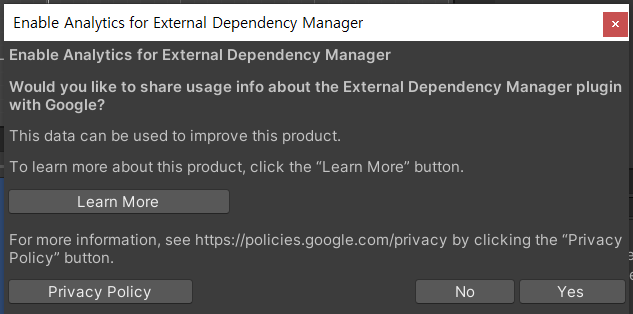
처음에 스크립트 등록하면 뭐 뜸
-
Yes, Yes, Enable 누르면 됨
-
빈 오브젝트에 FirebaseManager 달고 실행하면 됨
Firebase 로그인
-
지원하는 로그인 방식
- 이메일/비밀번호
- 익명 로그인
- 소셜 로그인
- 기타 (전화번호 로그인, 커스텀 토큰 등등)
-
로그인 성공 시 얻는 정보 (FirebaseUser)
- UserId : 고유 UID ⇒ 데이터베이스 키로 가장 많이 쓰임
- Email : 이메일 로그인인 경우
- IsAnonymous : 익명 로그인인 경우
- ProviderId : 소셜 / 익명 로그인인 경우
-
자주 쓰이는 함수들
// 회원가입
Auth.CreateUserWithEmailAndPasswordAsync(email, password)

// 로그인
Auth.SignInWithEmailAndPasswordAsync(email, password)

// 익명 로그인
Auth.SignInAnonymouslyAsync()

// 로그아웃
Auth.SignOut();

// 비밀번호 재설정
Auth.SendPasswordResetEmailAsync(email)-
게임/앱에서 활용하는 방법
- 게스트 로그인 → 이메일 계정 전환
- 튜토리얼은 게스트로 시작
- 게임 저장 데이터는 UID로 관리
- 나중에 “계정 연동하면 보상 지급” → 이메일/구글 계정 연결
- 소셜 로그인
- 소셜 계정 하나로 앱 여러 개 이용 가능
- 탈퇴율 감소
- 비밀번호 재설정
- 고객센터 부담 줄음 → 유저가 직접 메일로 초기화 가능
- 게스트 로그인 → 이메일 계정 전환
-
주의 : 로그인을 하려면 Firebase 콘솔 > Authentication > Sign-in method 활성화 해줘야됨
-
실제 게임에서는 게스트 로그인 → 계정 연동 패턴이 가장 흔함
FireStore
- Firebase가 제공하는 클라우드 문서형(NoSQL) DB
- 서버 없이 데이터 저장, 조회, 실시간 동기화 가능
- 데이터 구조
- 컬렉션 안에 여러 문서를 가짐
- 문서는 JSON과 유사한 키:값 데이터
- 문서 안에 또 하위 컬렉션을 둘 수 있음
// 예시
users (컬렉션)
  └─ uid123 (문서)
       ├─ name: "홍길동"
       ├─ level: 15
       └─ items (하위 컬렉션)
└─ item001 (문서)- 주요 기능
- 저장
- 조회
- 실시간 리스너
- 트랜잭션/배치
- 게임에서의 활용 예시
- 유저 프로필 관리
- 리더보드
- 채팅 (실시간 리스너 활용)
- 인벤토리, 퀘스트 진행 상황 저장
- 장점 : 실시간, 확장성, 구조적 데이터 관리, 강력한 쿼리
- 주의 : 읽기 요청 수에 따른 과금. → 리스너 남용 주의, 보안 규칙 꼭 설정
- Firestore 콘솔에서 Firestore Database에서 확인할 수 있음
- UID랑 일치하는 문서를 가져오면 됨
RTDB (Realtime Database)
- 실시간 동기화용 NoSQL DB
- 큰 JSON 트리 구조로 데이터를 저장
- 데이터 변경 시 모든 클라이언트에 즉시 반영
- Root 아래에 JSON 형태로 데이터를 배치
- 주요 기능
- 쓰기
- 읽기
- 실시간 리스터
- 게임에서의 활용 예시
- 실시간 채팅
- 멀티플레이 로비
- 온라인 상태 표시
- 랭킹/점수판
- 장점 : 빠른 실시간 동기화, 구현 단순, 저렴
- 주의 : 쿼리 기능 제한적, 데이터 커지면 구조 관리 어려움 → Firestore와 병행
| FireStore | RTDB | |
|---|---|---|
| 데이터 구조 | 컬렉션 + 문서 | JSON 트리 |
| 쿼리 기능 | 강력 | 제한적 |
| 실시간 동기화 | 지원(리스너) | 기본 내장 |
| 확장성 | 대규모 데이터, 복잡한 구조에 적합 | 간단 구조, 소규모/실시간 적합 |
| 오프라인 지원 | 있음 | 있음 |
| 비용 과금 | 읽기/쓰기/저장/대역폭 기준 과금 | 읽기/쓰기/저장/대역폭 기준 과금(좀 더 저렴) |
| 대표 사용예 | 사용자 데이터, 인벤토리, 리더보드, 채팅, 로그 저장 | 채팅, 멀티플레이 로비, 온라인 표시, 실시간 동기화 |
-
Firestore : 정리된 문서함 → 구조적이고 검색이 필요한 데이터
-
RTDB : 빠른 화이트보드 → 실시간 공유가 중요한 데이터
-
자주 쓰는 조합
- RTDB : 로비/채팅/온라인 상태
- Firestore : 유저 프로필/진행도/랭킹
Firebase Storage
- 클라우드 파일 저장소
- Firestore, RTDB는 텍스트/숫자용, Storage는 큰 파일용
- 버킷 기반
- 버킷 안에 폴더/파일 경로 구조로 저장
- 실제로는 Google Cloud Storage 위에서 동작
- 주요 기능
- 파일 업로드 (PutFileAsync, PutBytesAsync)
- 파일 다운로드 (GetFileAsync, GetBytesAsync)
- URL 생성 (다운로드 링크)
- 메타 데이터 읽기/수정 (업로드한 유저, 크기, MIME 타입 등)
- 게임에서 활용 예시
- 유저 프로필 이미지 저장
- 스크린샷/리플레이 업로드
- 커스텀 콘텐츠 공유
- 이벤트 배너/리소스 업데이트
- 장점 : 대용량 파일 저장에 최적화, Firebase Auth와 권환 관리 연동 가능
- 주의 : 읽기/쓰기 과금 있음. 직접 파일을 DB에 넣지 말고 경로/URL만 넣으셈
Firebase Storage + Unity Addressables
- Storage에 어드레서블 빌드 결과 (AssetBundle)를 올려두면 유니티에서 원격으로 부를 수 있음
- 연동 순서
- 유니티에서 어드레서블을 빌드함 → .bundle 파일이랑 catalog.json 생김
- Firebase Storage 버킷에 업로드함 (예: /assetbundles/v1/catalog.json)]
- 유니티 앱 시작 시 Storage 파일 URL을 받아옴
- StorageReference.GetDownloadUrlAsync()
- catalog.json / bundle 파일의 https 링크 획득
- 어드레서블 초기화 시 catalog.json의 URL을 지정해서 로딩함
- 장점
- 별도의 서버 없이 Firebase Storage로 원격 에셋 배포 가능
- Firebase 보안 규칙으로 접근 제어 가능 (ex. 로그인 된 유저만 다운 가능 등)
- 다른 Firebase 기능 (Remote Config)와 연계 가능 → 실시간 번들 버전 전환 가능
- 주의점
- Storage는 CDN(캐싱/빠른 배포) 목적이 아니라 기본 GCS 속도이기 때문에, 대규 트래픽에서는 Cloud CDN 같은 별도 서비스를 권장함
- Storage에서 Addressavbles catalog/bundle 불러올 때 https URL을 받아야 하기 때문에, GetDownloadUrlAsync() → Addressables.LoadContentCatalogAsync(url) 순서를 지켜야 함
- 파일 권한을 적절히 설정해야 함 (테스트 중에는 공개, 서비스 시에는 Auth 기반 접근 제어)
- 흐름 예시
using Firebase.Storage;
using UnityEngine;
using UnityEngine.AddressableAssets;
using UnityEngine.ResourceManagement.AsyncOperations;

public class AddressablesFromFirebase : MonoBehaviour
{
	void Start()
	{
		var storage = FirebaseStorage.DefaultInstance;
		// 카탈로그 파일의 경로를 가져옴
		var catalogRef = storage.GetRefernece("assetBundles/v1/catalog.json");

		// 카탈로그의 다운로드 경로를 받아옴
		catalogRef.GetDownloadUrlAsync().ContinueWith(task =>
		{

			if(task.IsCompleted)
			{
			// 다 받아오면 그 다운로드 경로를 저장
				string url = task.Result.ToString();
				// 그리고 어드레서블에서 가져옴
				// 어드레서블에서 다 가져온 뒤에는 OnCatalogLoaded 함수 실행하도록 연결
				Addressables.LoadContentCatalogAsync(url).Completed += OnCatalogLoaded;
			}
		});
	}

	void OnCatalogLoaded(AsyncOperationHandle<IResourceLocator> handle)
	{
	// 다운로드 경로 가져오고 어드레서블 준비 완료되면 그때 실행됨
		Debug.Log("Addressables Catalog Loaded from Firebase!");
		// 이후에 Addressables.LoadAssetAsync<T>("Key") 가능
	}
}
Firebase vs Playfab
- PlayFab : 게임 전용 백엔드 서베스. MS사에서 제공하는 게임 특화 서버임
| 항목 | PlayFab | Firebase |
|---|---|---|
| 제공사 | Microsoft | |
| 주 사용처 | 게임 | 앱 전반 |
| 로그인/인증 | 가능 | 가능 |
| 아이템/인벤토리 | 강력 지원 | 직접 구현 필요 |
| 분석/통계 | 기본 제공 | 강력한 분석 툴 |
| 가격 정책 | 무료+과금 | 무료+과금 |
- 게임 서비스는 Playfab이 더 편리
- 앱 서비스 전반에서는 Firebase가 더 범용적이고 강력함
- 사용 예시
- PlayFab : 유저가 결제를 하면 바로 PlayFab 서버가 구매를 검증 → 아이템 지급
- Firebase : 유저가 앱을 설치한 후 3일 안에 자주 쓰는 기능 분석 → 푸시 알림 발송
직접 실습
로그인 만들기
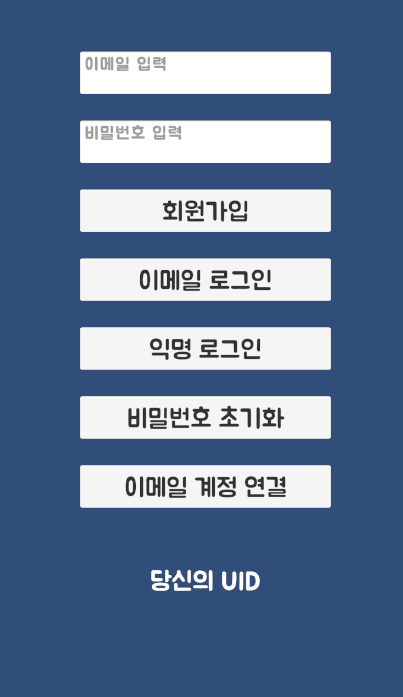
- UI 세팅
- 코드
// FirebaseAuthService.cs
public static class FirebaseAuthService
{
    public static FirebaseAuth Auth => FirebaseAuth.DefaultInstance;
    public static FirebaseUser CurrentUser => Auth.CurrentUser;

    // 게스트 (익명) 로그인
    // onSuccess : 성공하면 그 정보 가지고 처리할 내용
    // onError : 에러나면 에러 정보 출력
    public static void SignInAnonymously(Action<FirebaseUser> onSuccess, Action<string> onError)
    {
        Auth.SignInAnonymouslyAsync().ContinueWithOnMainThread(t =>
        {
            // 여기서 t 는 Auth 결과가 담긴 태스크
            if (t.IsFaulted || t.IsCanceled) // 로그인 실패하면
            {
                onError?.Invoke(DescribeException(t.Exception));
            }
            else // 로그인 성공하면
            {
                onSuccess?.Invoke(t.Result.User);
            }
        });
    }

    // 이메일 회원가입
    // 익명 로그인처럼 onSuccess와 onError를 가짐
    public static void SignUpWithEmail(string email, string password, Action<FirebaseUser> onSuccess,
        Action<string> onError)
    {
        Auth.CreateUserWithEmailAndPasswordAsync(email, password).ContinueWithOnMainThread(t =>
        {
            if (t.IsFaulted || t.IsCanceled) onError?.Invoke(DescribeException(t.Exception));
            else onSuccess?.Invoke(t.Result.User);
        });
    }

    // 이메일 로그인
    public static void SignInWithEmail(string email, string password, Action<FirebaseUser> onSuccess,
        Action<string> onError)
    {
        Auth.SignInWithEmailAndPasswordAsync(email, password).ContinueWithOnMainThread(t =>
        {
            if (t.IsFaulted || t.IsCanceled) onError?.Invoke(DescribeException(t.Exception));
            else onSuccess?.Invoke(t.Result.User);
        });
    }

    // 비밀번호 재설정 메일
    public static void SendPasswordReset(string email, Action onSuccess, Action<string> onError)
    {
        Auth.SendPasswordResetEmailAsync(email).ContinueWithOnMainThread(t =>
        {
            if (t.IsFaulted || t.IsCanceled) onError?.Invoke(DescribeException(t.Exception));
            else onSuccess?.Invoke();
        });
    }

    // 익명 계정 -> 이메일 계정으로 연동
public static void LinkAnonymousToEmail(string email, string password, Action<FirebaseUser> onSuccess,
        Action<string> onError)
    {
        var user = CurrentUser;
        if (user == null || !user.IsAnonymous)
        {
            onError?.Invoke("현재 익명 로그인 상태가 아닙니다.");
            return;
        }

        // 이메일 자격 증명을 생성함.
        // 자격 증명 : 열쇠 만들기
        // 로그인 : 열쇠로 문 열기
        // 여기서는 익명 아이디를 이메일 자격 증명과 연결하는 순서로 진행
        var cred = EmailAuthProvider.GetCredential(email, password);
        user.LinkWithCredentialAsync(cred).ContinueWithOnMainThread(t =>
        {
            if (t.IsFaulted || t.IsCanceled) onError?.Invoke(DescribeException(t.Exception));
            else onSuccess?.Invoke(t.Result.User);
        });
    }

    // 로그아웃
    public static void SignOut() => Auth.SignOut();

    // 에러 메시지 정리용
    public static string DescribeException(Exception ex)
    {
        if (ex is AggregateException ag)
        {
            foreach (var inner in ag.InnerExceptions)
            {
                var s = DescribeSingle(inner);
                // DescribeSingle 안에서 에러를 찾았으면 그걸 반환
                if (!string.IsNullOrEmpty(s)) return s;
            }
        }

        // a ?? b => a가 null 이면 b를 return        // a ?? b ?? c => a가 null 이면 b 검사. b null 이면 c return        return DescribeSingle(ex) ?? ex?.Message ?? "Unknown error";
    }


    // 에러 하나에 대한 메시지
    private static string DescribeSingle(Exception ex)
    {
        if (ex is FirebaseException fe)
        {
            // AuthError 코드 매핑 시도
            if (Enum.IsDefined(typeof(AuthError), fe.ErrorCode))
            {
                var code = (AuthError)fe.ErrorCode;
                switch (code)
                {
                    case AuthError.EmailAlreadyInUse: return "이미 사용 중인 이메일입니다.";
                    case AuthError.InvalidEmail: return "이메일 형식이 올바르지 않습니다.";
                    case AuthError.WeakPassword: return "비밀번호가 너무 약합니다.";
                    case AuthError.WrongPassword: return "비밀번호가 올바르지 않습니다.";
                    case AuthError.UserNotFound: return "해당 사용자를 찾을 수 없습니다.";
                    case AuthError.UserDisabled: return "비활성화된 계정입니다.";
                    case AuthError.AccountExistsWithDifferentCredentials: return "다른 인증 수단으로 이미 가입된 계정입니다.";
                    case AuthError.RequiresRecentLogin: return "민감 작업: 최근 로그인(재인증) 필요.";
                    case AuthError.CredentialAlreadyInUse: return "이미 다른 계정에 연동된 자격 증명입니다.";
                    default: return $"Firebase Auth 오류: {code} / Firebase Auth 메세지: {ex}";
                }
            }
            return $"Firebase 오류({fe.ErrorCode}): {fe.Message}";
        }
        return null;
    }
}
// LoginUI.cs
public class LoginUI : MonoBehaviour
{
private string email;
private string password;
public TextMeshProUGUI uidText;
public void OnEditEmail(string email)
{
this.email = email;
}
public void OnEditPassword(string pw)
{
this.password = pw;
}
public void OnClickGuestLogin()
{
FirebaseAuthService.SignInAnonymously(
(user) =>
{
Debug.Log($"게스트 로그인 성공! UID = {user.UserId}, IsAnon = {user.IsAnonymous}");
UidTextSetting(user);
},
Debug.LogError);
}
public void OnClickEmailLogin()
{
FirebaseAuthService.SignInWithEmail(email, password,
(user) =>
{
Debug.Log($"로그인 성공! UID = {user.UserId}, IsAnon = {user.IsAnonymous}");
UidTextSetting(user);
},
Debug.LogError);
}
public void OnClickEmailSignUp()
{
FirebaseAuthService.SignUpWithEmail(email, password,
(user) =>
{
Debug.Log($"회원가입 성공! UID = {user.UserId}, IsAnon = {user.IsAnonymous}");
UidTextSetting(user);
},
Debug.LogError);
}
public void OnClickResetPassword()
{
FirebaseAuthService.SendPasswordReset(email,
() => Debug.Log($"{email} <- 이메일로 비밀번호 초기화 이메일 전송 완료"),
Debug.LogError);
}
public void OnLinkCredential()
{
FirebaseAuthService.LinkAnonymousToEmail(email, password,
(user) =>
{
Debug.Log($"게스트에서 이메일로 계정 연결 완료");
UidTextSetting(user);
},
Debug.LogError);
}
public void UidTextSetting(FirebaseUser user)
{
uidText.text = user.UserId;
}
}- 유니티 로그와 Firebase 콘솔에서 확인
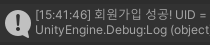


- 게스트 → 이메일 연결 확인 완료
Firestore 사용해보기
- 파이어베이스 콘솔에서 파이어스토어 데이터베이스 사용 설정
// FireStoreService.cs
public class FirestoreService : MonoBehaviour
{

    private static FirebaseFirestore DB => FirebaseFirestore.DefaultInstance;

    // 문서 쓰기
    public static void Set(string col, string docId, Dictionary<string, object> data, bool merge = false)
    {
        // 병합할거면 병합하고 아니면 그냥 씀
        var task = merge
? DB.Collection(col).Document(docId).SetAsync(data, SetOptions.MergeAll)
            : DB.Collection(col).Document(docId).SetAsync(data);
        task.ContinueWithOnMainThread(t =>
        {
            if (t.IsFaulted || t.IsCanceled) Debug.LogError(FSUtil.Err(t.Exception));
            else Debug.Log($"Set {(merge ? "(Merge)" : "")} OK: {col}/{docId}");
        });
    }

    // 업데이트
    public static void Update(string col, string docId, Dictionary<string, object> data)
    {
        DB.Collection(col).Document(docId).UpdateAsync(data)
            .ContinueWithOnMainThread(t =>
            {
                if (t.IsFaulted || t.IsCanceled) Debug.LogError(FSUtil.Err(t.Exception));
                else Debug.Log($"Update OK: {col}/{docId}");
            });
    }

    // 문서 읽기
    public static Dictionary<string, object> Get(string col, string docId)
    {
        Dictionary<string, object> data = new ();
        DB.Collection(col).Document(docId).GetSnapshotAsync()
            .ContinueWithOnMainThread(t =>
            {
                if (t.IsFaulted || t.IsCanceled) Debug.LogError(FSUtil.Err(t.Exception));
                var snap = t.Result;
                if (!snap.Exists)
                {
                    Debug.Log($"{col}/{docId}에 문서 없음");
                    data = null;
                    return;
                }
                else
                {
                    data = snap.ToDictionary();
                    return;
                }
            });
        return data;
    }

    // 문서 삭제
    public static void Delete(string col, string docId)
    {
        DB.Collection(col).Document(docId).DeleteAsync()
            .ContinueWithOnMainThread(t =>
            {
                if (t.IsFaulted || t.IsCanceled) Debug.LogError(FSUtil.Err(t.Exception));
                else Debug.Log($"🗑Delete OK: {col}/{docId}");
            });
    }

    // 상위 N개 추출
    public static void TopN(string collection, string orderByField, int limit = 10, bool desc = true,
        string displayNameField = "name")
    {
        Query q = DB.Collection(collection);
        // 오름차순 or 내림차순으로 조회
        q = desc ? q.OrderByDescending(orderByField) : q.OrderBy(orderByField);
        // Limit 개수만큼 지정
        q = q.Limit(limit);

        q.GetSnapshotAsync().ContinueWithOnMainThread(t =>
        {
            if (t.IsFaulted || t.IsCanceled)
            {
                Debug.LogError(t.Exception != null ? t.Exception.ToString() : "TopN 쿼리 실패 (예외 정보 없음)");
                return;
            }

            // 결과물을 List<DocumentSnapShot> 으로 가져옴
            var docs = t.Result.Documents.ToList();

            if (docs.Count == 0)
            {
                Debug.Log("결과 없음 (문서가 없거나 인덱스/규칙 문제 가능)");
                return;
            }

            int rank = 1;
            foreach (var doc in docs)
            {
                var data = doc.ToDictionary();
                string score = ReadNumber(data, orderByField);
                string name = ReadString(data, displayNameField);
                // 예: #1  abc123  score=9999  name=홍길동
                Debug.Log($"#{rank,2}  {doc.Id}  {orderByField}={score}  {displayNameField}={name}");
                rank++;
            }
        });
    }

    // ===== 7) 쿼리: where + order + limit =====
    public static void WhereOrderLimit(
        string col, string whereField, object equalsValue,
        string orderField, int limit, bool desc = false)
    {
        Query q = DB.Collection(col).WhereEqualTo(whereField, equalsValue);
        q = desc ? q.OrderByDescending(orderField) : q.OrderBy(orderField);
        q = q.Limit(limit);

        q.GetSnapshotAsync().ContinueWithOnMainThread(t =>
        {
            if (t.IsFaulted || t.IsCanceled)
            {
                var ex = t.Exception;
                if (ex != null) Debug.LogError(FSUtil.Err(ex));
                else Debug.LogError("Firestore 작업 실패 (예외 정보 없음)");
                return;
            }
            Debug.Log($"Query {col} where {whereField}=={equalsValue} order {orderField} {(desc?"DESC":"ASC")} limit {limit}");
            foreach (var doc in t.Result.Documents)
                Debug.Log($" - {doc.Id} => {FSUtil.DictToString(doc.ToDictionary())}");
        });
    }

    // 실시간 리스너 문서
    public static ListenerRegistration ListenDoc(string col, string docId)
    {
        return DB.Collection(col).Document(docId)
            .Listen(MetadataChanges.Include, snapshot =>
            {
                if (!snapshot.Exists)
                {
                    Debug.Log($"(Doc) 없음: {col}/{docId}");
                    return;
                }

                // 메타데이터 변경 이벤트까지 받고 싶으면 MetadataChanges.Include 전달
                Debug.Log($"(Doc) {col}/{docId} => {FSUtil.DictToString(snapshot.ToDictionary())}");
            });
    }

    // 실시간 리스너 쿼리
    public static ListenerRegistration ListenQuery(string col, string whereField, object equalsValue)
    {
        return DB.Collection(col).WhereEqualTo(whereField, equalsValue).Listen(MetadataChanges.Include,
            snap =>
            {
                Debug.Log($"(Query) {col} where {whereField}=={equalsValue}");
                foreach (var doc in snap.Documents)
                    Debug.Log($" - {doc.Id} => { FSUtil.DictToString(doc.ToDictionary())}");
            }
        );
    }

    // 배치
    public static void DemoBatch()
    {
        var batch = DB.StartBatch();
        var a = DB.Collection("demo").Document("A");
        var b = DB.Collection("demo").Document("B");

        batch.Set(a, new Dictionary<string, object> {
            {"val", 1}, {"ts", Timestamp.GetCurrentTimestamp()}
        });
        batch.Update(b, new Dictionary<string, object> {
            {"count", FieldValue.Increment(1)}
        });

        batch.CommitAsync().ContinueWithOnMainThread(t =>
        {
            if (t.IsFaulted || t.IsCanceled) Debug.LogError(FSUtil.Err(t.Exception));
            else Debug.Log("Batch Commit OK");
        });
    }

    // 트랜잭션 써서 카운트 증가
    public static void TxIncrement(string col, string docId, string field)
    {
        DB.RunTransactionAsync(async tx =>
        {
            var docRef = DB.Collection(col).Document(docId);
            var snap = await tx.GetSnapshotAsync(docRef);

            long cur = 0;
            if (snap.Exists && snap.TryGetValue(field, out long v)) cur = v;

            long next = cur + 1;
            tx.Update(docRef, new Dictionary<string, object> { { field, next } });
            return next;
        })
        .ContinueWithOnMainThread(t =>
        {
            if (t.IsFaulted || t.IsCanceled) Debug.LogError(FSUtil.Err(t.Exception));
            else Debug.Log($"Tx Counter = {t.Result}  ({col}/{docId}.{field})");
        });
    }

    // 오브젝트의 타입에 따라 다르게 읽기
    static string ReadNumber(IDictionary<string, object> dict, string field)
    {
        if (dict == null || !dict.TryGetValue(field, out var v) || v == null) return "null";
        if (v is long l) return l.ToString();
        if (v is int i)  return i.ToString();
        if (v is double d) return d.ToString("0.######");
        if (v is float f)  return f.ToString("0.######");
        return v.ToString();
    }

    static string ReadString(IDictionary<string, object> dict, string field)
    {
        if (dict != null && dict.TryGetValue(field, out var v) && v != null) return v.ToString();
        return "";
    }
}