
오늘 학습 키워드
유니티 심화 팀 프로젝트, 스탠다드 반 강의
오늘 학습 한 내용을 나만의 언어로 정리하기
유니티 심화 팀 프로젝트
변경된 BT
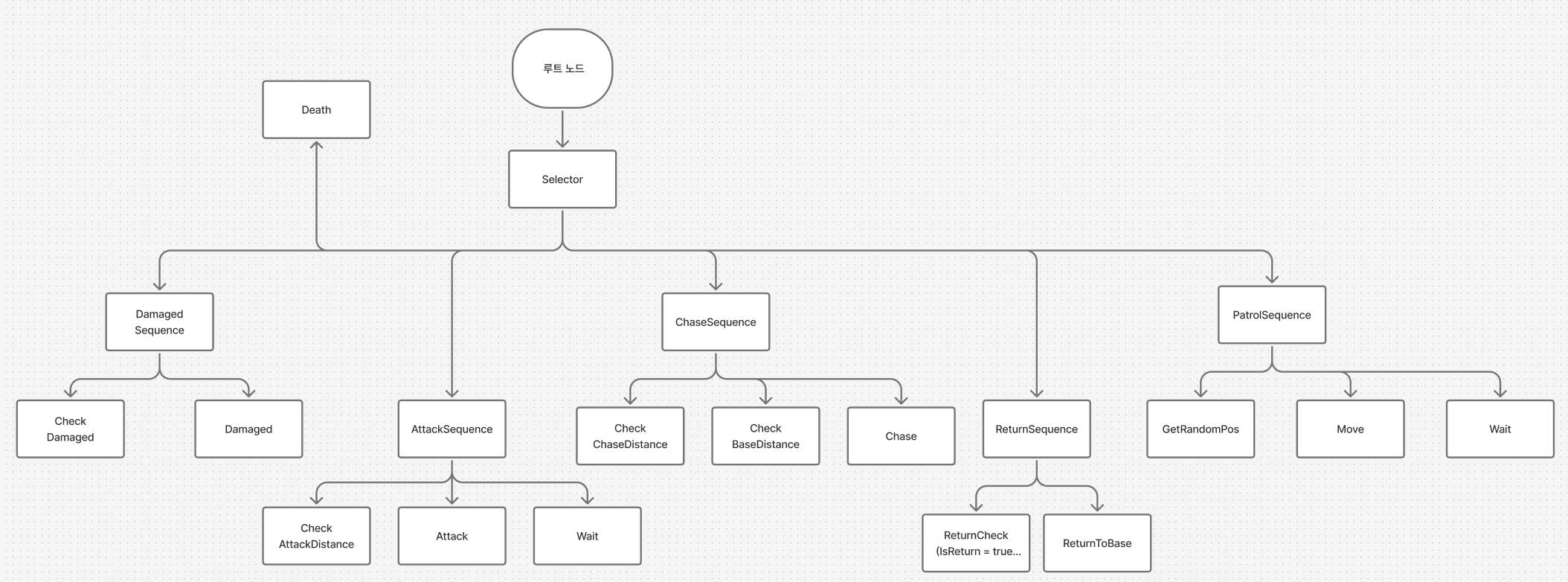
-
Damaged Sequence 추가
-
Return Sequence의 위치 변경
-
Damaged 상태에서 isReturn = false 하고, Base위치를 맞았을 때의 위치로 변경할 예정
Return 부터 만들기
// ReturnCheckNode.cs
public class ReturnCheckNode : Node
{
    private MonsterAI monsterAI;

    public ReturnCheckNode(MonsterAI monsterAI)
    {
        this.monsterAI = monsterAI;
    }

    public override NodeState Evaluate()
    {
        if (monsterAI.isReturn)
        {
            state = NodeState.Success;
            monsterAI.Destination = monsterAI.BasePosition;
        }
        else
        {
            state = NodeState.Failure;
        }
        return state;
    }
}- Move 자체는 똑같아서 따로 안만듬
공격 만들기
- 애니메이션 프록시를 두고, 그게 부모에 있는 MonsterAI를 찾아서 Invoke하도록 함
- 공격 가능한지 여부는 Chase 가능한지랑 같기 때문에 패스
// AttackPlayerNode.cs
public class AttackPlayerNode : Node
{
    private MonsterAI monsterAI;
    private Transform player;
    private float distance;

    public AttackPlayerNode(MonsterAI monsterAI, Transform player)
    {
        this.monsterAI = monsterAI;
        this.player = player;
    }

    public override NodeState Evaluate()
    {
        if (monsterAI.isAttackDone)
        {
            // 공격 끝난 경우
            monsterAI.isAttackDone = false;
            Debug.Log("Attack Done!");
            state = NodeState.Success;
        }
        // 이미 공격 중인 경우
        else if (monsterAI.Monster.Animator.animator.GetBool(monsterAI.Monster.Animator.data.AttackHash)
            && !monsterAI.isAttackDone)
        {
            state = NodeState.Running;
        }
        // 공격 중이지 않은 경우, 공격 시도
else
        {
            monsterAI.Attack();
            monsterAI.isAttackDone = false;
            state = NodeState.Running;
        }
        return state;
    }
}- 프록시 받을 수 있도록 MonsterAI에다가 추상 함수 추가
// MonsterAI.cs
public abstract void HandleAnimationEvent(string eventName);
// WarriorMonsterAI.cs
public override void HandleAnimationEvent(string eventName)
{
Debug.Log($"{eventName}");
Invoke(eventName, 0f);
}
public override void Attack()
{
// Debug.Log("Warrior Attack Start");
Monster.Animator.StartAnimation(Monster.Animator.data.AttackHash);
}
public void ParryingStart()
{
// Debug.Log("Parrying Start");
AttackCollider.gameObject.SetActive(true);
}
public void ParryingStop()
{
// Debug.Log("Parrying Stop");
AttackCollider.gameObject.SetActive(false);
}
public void StopAttack()
{
// Debug.Log("Attack Stop");
Monster.Animator.StopAnimation(Monster.Animator.data.AttackHash);
isAttackDone = true;
}스탠다드 반 강의 (주제 : 프레임워크)
매니저 종류
- GameManager, UIManager 등등..
- 특정 씬에서만 필요한게 아니고 전체적으로 필요한 애들은 싱글톤 매니저라고 함
// Singleton.cs
public abstract class Singleton<T> : MonoBehaviour where T : Singleton<T>
{
	private static T _instance = null;

// 굳이 직접 안만들어도 호출 하는 순간 생성하기 때문에 유용함
	public static T Instance
	{
		get
		{
			Create();
			return _instance;
		}
	};

	static void Create()
	{
		if(_instance == null)
		{
		// 타입이 T 인 오브젝트 찾기
			T[] objects = FindObjectsByType<T>(FindObjectSortMode.None);

			// 오브젝트를 찾았더니 있을 때
			if(objects.Length > 0)
			{
			// 맨 앞에 있는 애가 Instance
				_instance = objects[0];

				for(int i = 1; i < objects.Length; i++)
					DestroyImmediate(objects[i].gameObject);
			}
			// 오브젝트를 찾았더니 없을 때
			else
			{
			// 새로 만들어주기
				GameObjct go = new GameObject($"{typeof(T).Name}");
				_instance = go.AddComponent<T>();
			}

		}
	}

	// 생명주기 함수 다 virtual 로 만들어두는게 좋음
	protected virtual void Awake()
	{
		Create();
		if(_instance != this)
		{
			Destroy(gameObject);
		}
		else
		{
			DontDestroyOnLoad(this);
		}
	}

	protected virtual void OnEnable() { }
	protected virtual void Start() { }
	protected virtual void Update() { }
	protected virtual void FixedUpdate() { }
	protected virtual void LateUpdate() { }
	protected virtual void OnDisable() { }
	protected virtual void OnDestroy()
	{
		_instance = null;
	}
}
Resource Manager
public enum eAssetType
{
	Prefab,
	Thumbnail,
	UI,
	Data,
	SO,
	Sound
}

public enum eCategoryType
{
	None,
	Item,
	NPC,
	Stage,
	Character,
	Maps,
	Model
}

public class ResourceManager : Singleton<ResourceManager>
{
// 오브젝트 풀
	private Dictionary<string, object> assetPool = new();

	public T LoadAsset<T>(string key, eAssetType assetType, eCategoryType categoryType = eCategoryType.None) where T : Object
	{
	// handle : 로드한 에셋을 받음
		T handle = default;

		var typeStr = $"{assetType}/{(categoryType == eCategoryType.None? "" : $"{categoryType}")}/{key}};

		if(assetPool.ContainsKey(key + "_" + typeStr))
		{
			var obj = Resources.Load(typeStr, typeof(T));

			if(obj == null) return default;

			assetPool.Add(key + "_" + typeStr, obj);
		}

		handle = (T)assetPool[key + "_" + typeStr];
		return handle;
	}


	// 참고 : 비동기로 하면 Object Pool에 데이터가 생성되기 전에 불러올 가능성 있음
	public async Task<T> LoadAsyncAsset<T>(string key, eAssetType assetType, eCategoryType categoryType = eCategoryType.None) where T : Object
	{
	// handle : 로드한 에셋을 받음
		T handle = default;

		var typeStr = $"{assetType}/{(categoryType == eCategoryType.None? "" : $"{categoryType}")}/{key}};

		if(assetPool.ContainsKey(key + "_" + typeStr))
		{
			var op = Resources.LoadAsync(typeStr, typeof(T));

			while(!op.IsDone)
			{
				Debug.Log(key + "로드 중...");
				await Task.Yield();
			}

			var obj = op.asset;

			if(obj == null) return default;

			assetPool.Add(key + "_" + typeStr, obj);
		}

		handle = (T)assetPool[key + "_" + typeStr];
		return handle;
	}
}
Scene Load Manager
// SceneLoadManager.cs

public class SceneLoadManager : Singleton<SceneLoadManager>
{
	public bool isManager = false;
	public string NowSceneName = "";

	protected override void Awake()
	{
		base.Awake();

		NowSceneName = SceneManager.GetActiveScene().name;
	}

	//
	public async void ChangeScene(string SceneName, Action callback == null, LoadSceneMode mode = LoadSceneMode.Single)
	{
		var op = SceneName.LoadSceneAsync(SceneName, mode);

		while(!op.isDone)
		{
			Debug.Log("로딩창 띄우기");
			await Task.Yield();
		}

		Debug.Log("로드 완료");
		// 씬 전환 후에 할 콜백 실행
		callback?.Invoke();
	}

	// 참고 : Addictive로 부르지 않은, Single로 부른 애를 Unlaod하면 오류남.

	public async void UnLoadScene(string SceneName, Action callback = null)
	{
		var op = SceneManager.UnloadSceneAsync(SceneName);
		while(!op.isDone)
		{
			await Task.Yield();
		}
		callback?.Invoke();
	}
}
Manager를 한 씬에 몰아넣기
- 매니저 씬을 따로 만들어서 그 씬을 Additive로 넣고, 좀 있다가 Unload를 하면 어차피 DontDestroy라서 계속 남아있음
// SceneBase.cs
public abstract class SceneBase : MonoBehaviour
{
	protected virtual void Awake()
	{
		if(!SceneLoadManager.Instance.isManager)
		{
			SceneLoadManager.Instance.ChangeScene("Manager", () =>
			{
				SceneLoadManager.Instance.isManager = true;
				SceneLoadManager.Instance.UnLoadScene("Manager");
			}, LoadSceneMode.Additive);
		}
	}
}